
40% of people leave when a website takes more than three seconds to load, according to the UX statistics summarized by Baymard Institute. Say you're a founder launching a webinar. Your ad works, someone taps, and then your magnificent dragon-sized hero image leaves them staring at an empty screen.
That's the trouble with judging an AI landing page generator by its first preview. Conjuring a page is useful. Conjuring one that earns completed actions, survives an honest experiment, and doesn't feel counterfeit is the true spell.
Table of Contents
- What an AI Landing Page Generator Must Beat
- How a Prompt Becomes a Live Page
- Speed Targets That Protect the Offer
- Sample Size Before You Crown a Winner
- Trust and Disclosure When Buyers Suspect AI
- Benefits, Limits and Crawl Health
- A Four Stage Funnel You Can Copy
- Pick a Generator With a Scorecard
What an AI Landing Page Generator Must Beat
6.6% is the cross-industry median landing-page conversion rate in the benchmark summarized by CartFlows, based on more than 41,000 pages, approximately 464 million visits, and 57 million conversions. Treat it as a reference point, not a forecast for your next campaign.
An AI landing page generator turns a plain-English description into a campaign page, including its offer, headline, proof, call to action, imagery, and layout. The apprentice mage can assemble the storefront. You decide which visitor action counts as success.
Landing page benchmarks a generator should face
| Benchmark | Figure | What the generator must do |
|---|---|---|
| Cross-industry median conversion | 6.6% | Measure a real conversion against this baseline |
| Dataset behind the median | 41,000+ pages, about 464 million visits, 57 million conversions | Treat it as a broad reference, not a single campaign anecdote |
Translate the benchmark into a build requirement
A broad median gives you a starting point, while your industry, offer, traffic source, and definition of conversion shape the result. A software buyer may weigh implementation, security, and team adoption; an entertainment offer asks for a different decision.
Say you're selling inventory software. The page should answer questions about importing products and connecting existing systems, rather than promise effortless transformation beneath a sparkling gradient. Industry relevance means addressing the buyer's actual hesitation.
Then choose one meaningful conversion. A completed demo booking is different from a button click that opens a calendar nobody finishes.
Before generating: Write down a relevant baseline and one primary action. Without both, you have no fair way to judge whether the page is working.
How a Prompt Becomes a Live Page
Say a solo founder needs to fill a webinar about launching an online course. They type make it modern, receive a handsome page, and discover that the headline could describe a bank, a bakery, or a dragon insurance broker.
The generator didn't receive enough direction. Treat generation as a sequence of decisions rather than a wish whispered into a crystal ball.
Make the brief do the heavy lifting
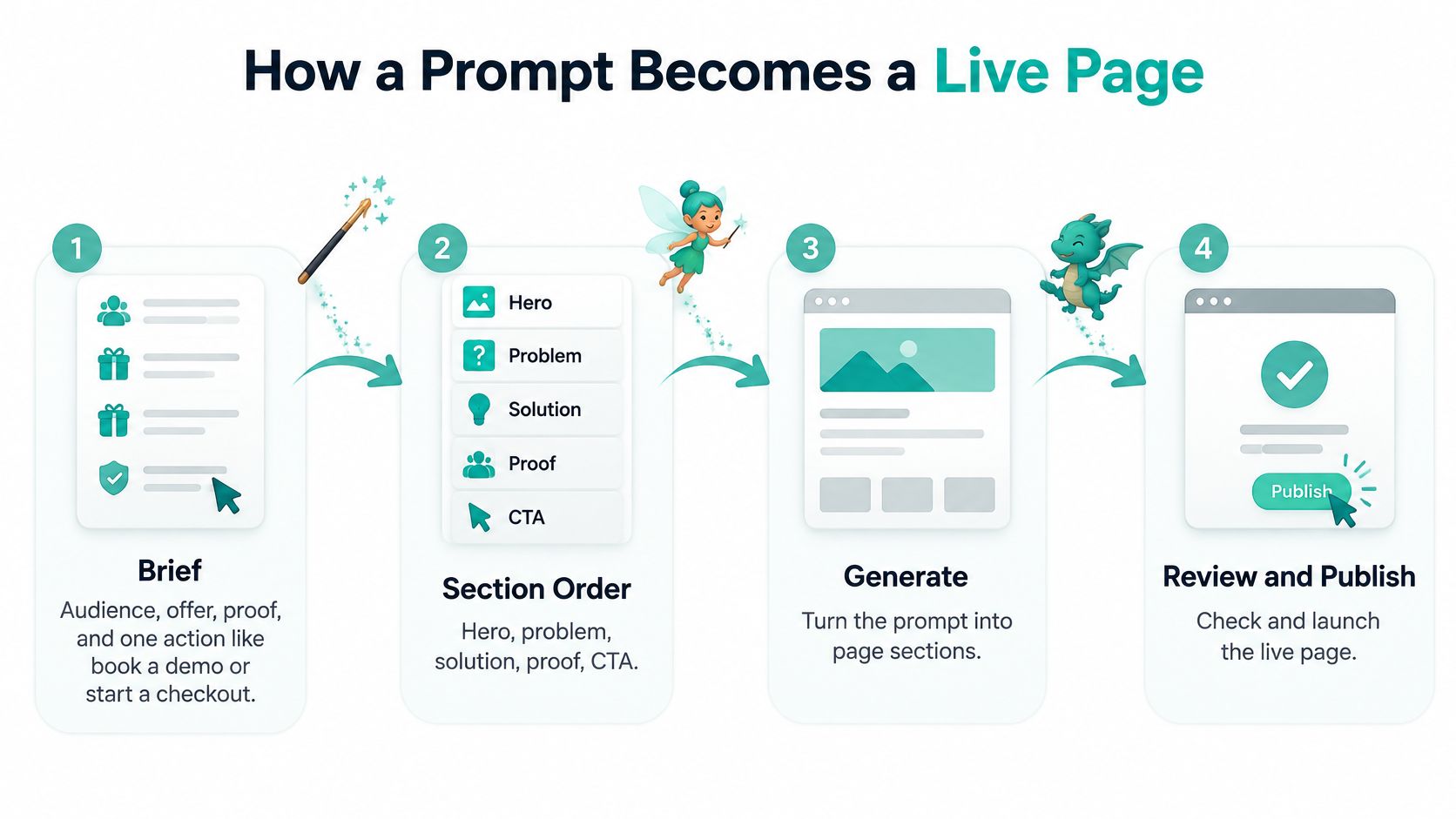
Define the audience, offer, proof, and action. Name who's arriving, what they'll get, why they should believe you, and what they should do. For the founder, the action is registration, not browsing a sprawling personal website.
Specify the section order. Request a hero, problem, offer, proof, objections, and registration form. This gives the page a persuasive sequence instead of a decorative pile of blocks.
Keep one promise through the copy. If the webinar teaches course-launch planning, don't let later sections drift into passive-income promises or unrelated coaching packages.
Give imagery the same brand direction. Describe the mood, palette, and subject. A practical workshop needs visuals that support learning, not a mysterious floating robot because someone mentioned AI.
Force a phone-width review. Check stacking, text wrapping, button labels, and form errors. Don't accept a desktop screenshot as evidence that the page works everywhere.
Connect the conversion event. Record successful registration, not merely a tap on the signup button. Complete a test registration and verify that the event arrives.
Publish with hosting and SSL. Open the live URL outside the editor, submit the form again, and confirm the destination and confirmation message.
The workflow is easier to follow when the decisions stay connected.
Replace vague wishes with usable instructions
The weak brief asks for an aesthetic: make it modern. The stronger brief supplies a buyer, a specific experience, approved evidence, and an unmistakable button.
For this hypothetical webinar, use the following prompt and replace the example details with your own:
Create a mobile-first landing page for course creators promoting a 45-minute webinar about planning their first course launch. Use a hero, audience problem, workshop outcomes, proof from three alumni whose approved quotes I'll supply, objections, and a registration form. Keep the promise practical and use Save my seat for the primary button. Use placeholders wherever evidence is missing, never invented testimonials. Include a registration-success event and a clear confirmation message.
After generation, chat edits should let you request a shorter hero or move proof beside the form without rebuilding the page by hand.
Speed Targets That Protect the Offer
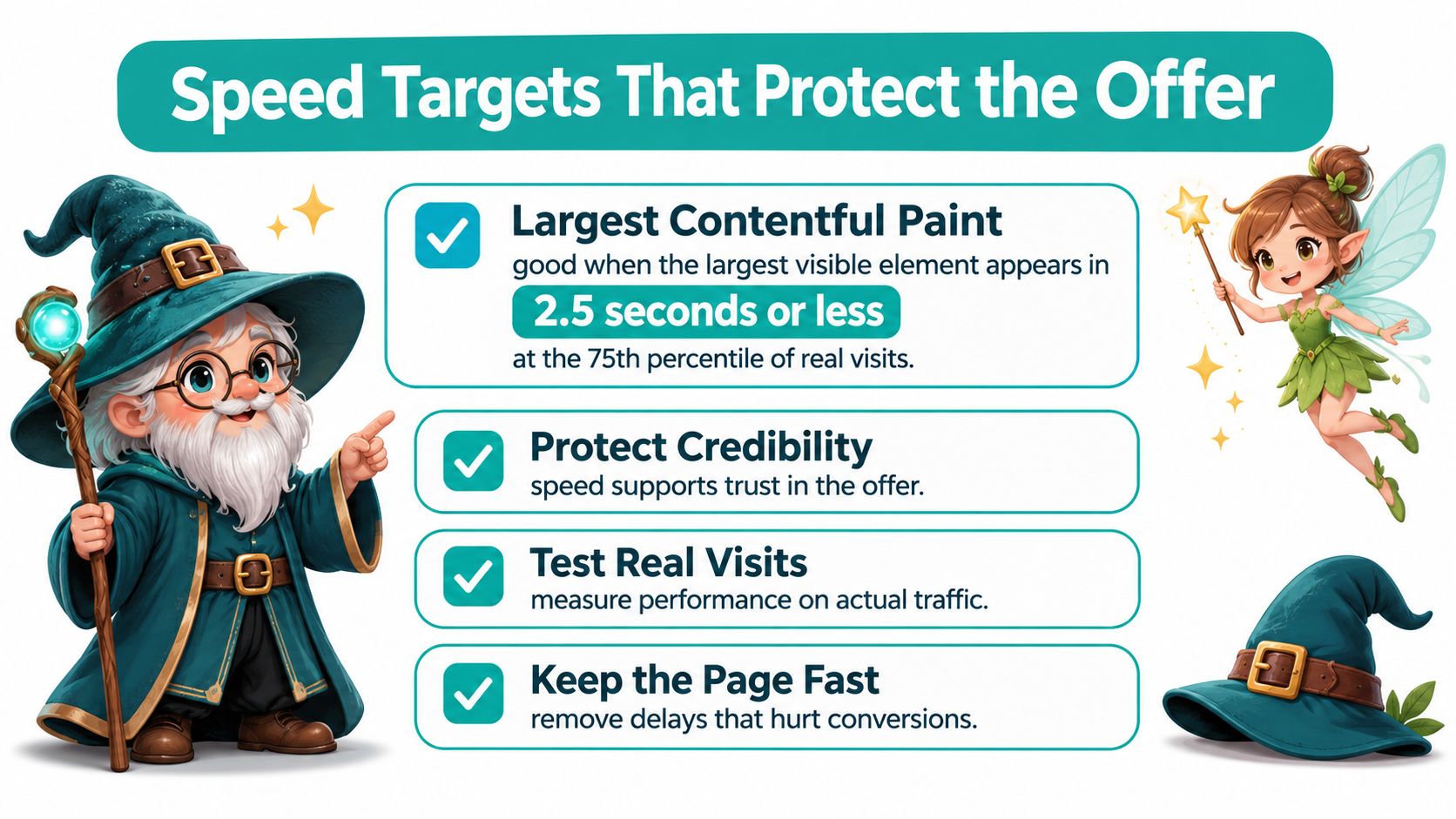
Largest Contentful Paint should be 2.5 seconds or less at the 75th percentile of visits to qualify as good under Google's Core Web Vitals guidance. LCP measures when the largest visible content element renders, which makes it a useful check on whether visitors can see your offer.
Say your landing page opens with a product photograph and a headline beside it. You upload the original image, add an animation library, and install a chat widget. On your fast office connection, everything seems fine. A visitor on a mobile connection gets a much less impressive performance.
Your paid click has already happened. Your offer hasn't finished appearing.
Give the optimizer a concrete job
A speed familiar needs a work order, not permission to chase a flattering score.
- Compress the hero: Resize the image to its display needs and serve an efficient format. Preserve enough detail to show the product clearly.
- Preload selectively: Prioritize the critical asset rather than declaring every file urgent.
- Lazy-load lower media: Defer images and video embeds below the initial viewport, not the hero visitors need immediately.
- Trim JavaScript: Remove unused widgets and duplicate trackers. Check whether decorative effects justify their loading cost.
- Inspect field measurements: Compare actual visits by page and device, then investigate geographic and connection-quality differences.
This checklist keeps the technical work attached to the visitor's experience.
Connect the fix to acquisition
Use the good-LCP boundary as a remediation trigger for mobile field performance. A fast desktop lab run shouldn't overrule evidence that real visitors are waiting.
Keep acquisition reporting beside the performance report. In Google Ads, review landing-page clicks, impressions, click-through rate, mobile-friendly click rate, and conversion breakdowns rather than celebrating an isolated technical improvement.
Our guide to optimizing website speed gives that maintenance work a practical home. Before scaling traffic, have hero asset weight, mobile field LCP, and a working conversion column ready to inspect.
The pixie can polish the loading sequence. You still need to see whether visitors complete the intended action.
Sample Size Before You Crown a Winner
Detecting a conversion increase from 2.00% to 2.02% can require approximately 1.5 million visitors, while detecting about a 10% improvement may require roughly 14,000 users, in the scale examples from Nielsen Norman Group. Those are planning examples, not universal sample requirements for every experiment.
An automatic winner badge can conceal a very ordinary problem: not enough evidence. A challenger headline may lead briefly because a few unusually motivated visitors happened to see it.
Traffic a landing test needs before a winner is real
| Detection goal | Rough sample | Practical call |
|---|---|---|
| Lift from 2.00% to 2.02% | About 1.5 million visitors | Don't chase a tiny effect |
| About a 10% improvement | Roughly 14,000 users | Possible when traffic is steady |
| Cosmetic tweak on a quiet page | Usually underpowered | Skip the test |
Test a reason someone might behave differently
Say a webinar page asks for a phone number, company size, job title, and business address before accepting a registration. Changing the button from teal to violet is a weaker hypothesis than removing unnecessary fields.
The stronger hypothesis names the obstacle: visitors don't want to disclose business details for an introductory workshop. A shorter form directly addresses that concern.
For low-volume pages, prioritize clearer offer framing, simpler forms, or a more obvious primary action. Don't confuse an easy-to-generate variation with a worthwhile experiment.
Set the stopping rule before launch
Estimate sample size using your baseline, the effect you need to detect, and the uncertainty you're willing to accept. Choose the primary event, randomize exposure, and decide how the experiment will conclude before traffic arrives.
Require a minimum sample and use a method that handles interim inspection appropriately. Checking the dashboard every hour and stopping at the first favorable result isn't a reliable promotion rule.
Report a confidence interval or posterior uncertainty, not just observed lift. Then inspect guardrails: did lead quality fall, did checkout completion worsen, or did revenue per visitor decline?
A winning signup variant isn't a business winner if it fills your calendar with people who'll never buy.
Use A/B testing for websites to organize the experiment, including the decision to leave a result inconclusive. If weekly traffic can't reach even the smaller illustrative sample within a useful campaign window, skip the cosmetic test and improve the offer directly.
A responsible alchemist knows when not to announce gold.
Trust and Disclosure When Buyers Suspect AI
Only 7% of consumers say visible AI-generated marketing makes them trust a brand more, while 31% say it makes them trust it less, according to international findings discussed by EMARKETER; 52% report they'd stop buying after an inauthentic experience, and 91% expect brands to disclose AI use.
The uncomfortable combination is that buyers can want transparency without liking what they see. A disclosure label won't turn an invented customer portrait into credible evidence.
Keep that human review in view when evaluating a generated design.

Authenticity needs something checkable
Say the generator produces a testimonial from a delighted baker alongside a photorealistic face. Unless that customer and endorsement are real and approved, delete them. Believable fiction is still fiction when it appears as buyer proof.
Replace generic praise with a permissioned customer quote, an accurate product photograph, or a demonstration someone can inspect. Have a human review the offer, prices, guarantees, and any legal or medical claims before publishing.
Disclosure describes the process. Proof supports the promise. You need both where they're relevant, and neither excuses misleading content.
Keep the distinction between attractive output and credible evidence in mind while viewing the accompanying video.
Make approval part of publishing
- Claims: Assign someone to verify factual statements against product documentation and current terms.
- Proof: Preserve the origin and approval of testimonials, screenshots, and customer imagery.
- Disclosure placement: Put concise explanations near relevant AI imagery or automated chat, and adapt wording to the audience and market.
Don't paste a vague footer confession beneath an otherwise unverifiable page. Visitors should understand what they're looking at where that distinction matters.
When testing presentation, compare accurate disclosure wording and specific authenticity cues without removing necessary transparency. Hiding the wand may preserve an initial impression, but it leaves you with a harder conversation if visitors discover that the apparent evidence was conjured.
Benefits, Limits and Crawl Health
The useful part of generation is straightforward: you can get a complete draft without assembling every section manually. Consistent styling makes related campaign pages easier to maintain, and automated checks can reduce repetitive link and metadata work.
The limit is equally straightforward: the publisher still owns the result. A beautiful preview doesn't establish that someone can access, read, or complete the page.
A polished draft can still exclude people
Testing discussed by WebAbility identifies layout, spacing, typography, and color contrast as recurring problems in AI-built landing pages; it also reports that only 48% of mobile sites and 56% of desktop sites passed all three Core Web Vitals in 2025. Those pass rates describe sites generally, not just AI-generated pages.
Assign an owner to check keyboard navigation, meaningful labels, heading order, and alternative text. Include zoom, reflow, and reduced-motion behavior in acceptance testing rather than assuming that responsive styling guarantees accessibility.
A decorative pixie needs no elaborate description. A product diagram explaining how the kit works does.
Keep experiment pages from haunting search
Google's crawl-budget documentation describes the URLs Google can and wants to crawl, and recommends managing URL inventory, consolidating duplicates, and eliminating soft-404 errors. Crawl-budget management matters especially as a site's inventory grows, not merely because a campaign has several pages.
Give recurring SEO checks a defined scope:
- Discovery: Confirm that intended pages have crawlable internal links and appropriate robots instructions.
- Response behavior: Inspect HTTP status codes, broken destinations, and pages that look missing but return successful responses.
- Inventory: Consolidate duplicate variants and retire obsolete experiment URLs deliberately.
- Metadata: Keep titles and descriptions aligned with each page's actual offer.
A recurring SEO patrol should identify these problems without indiscriminately rewriting or removing useful pages. Our explanation of crawling and indexing in SEO helps separate discovery problems from pages that need better content.
A Four Stage Funnel You Can Copy
Say you sell a $48 home-baking kit in a hypothetical campaign. Your generated landing page looks delicious, but shoppers still have to choose the kit, pay, decline or accept an add-on, and understand what happens next.
That journey deserves attention: Baymard Institute's cart-abandonment analysis, drawing on 50 studies, reports 70.22% average documented cart abandonment; separately, 17% of U.S. online shoppers abandoned an order because checkout was too long or complicated. Neither figure predicts your store's result, but both give you a better place to investigate than another decorative hero flourish.
The funnel view makes the handoffs visible.
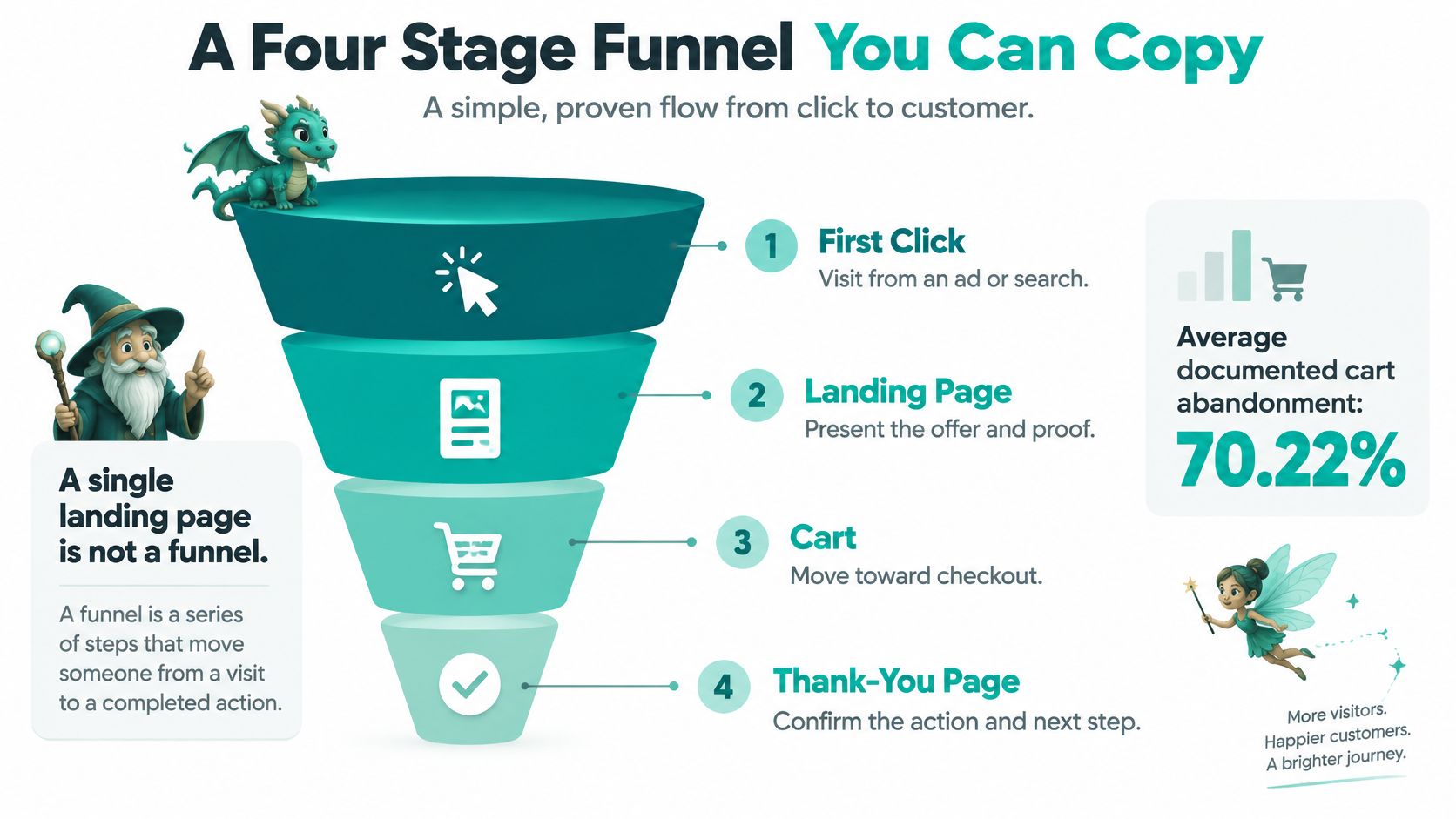
Give each stage a distinct job
| Stage | What to generate for the baking kit | Experiment worth considering | Metric |
|---|---|---|---|
| Landing | A clear baking outcome, product contents, approved proof, and an obvious buy button | Outcome-led headline versus contents-led headline | Add-to-cart rate |
| Checkout | Guest purchase, visible total, and necessary fields only | Simplified checkout versus the existing flow | Checkout completion |
| Upsell | A relevant optional refill, with an easy skip | Refill offer versus no add-on | Revenue per visitor |
| Thank-you | Order confirmation, delivery expectations, and contact details | Clearer next-step instructions | Successful access to order information |
On the landing page, show what the buyer will make and what arrives in the box. Don't force them to infer the product from a magical lifestyle photograph.
At checkout, keep the total visible and let buyers proceed without an unnecessary account. The optional refill belongs after the core purchase decision, with wording that makes acceptance and refusal equally understandable.
The thank-you page isn't a spare billboard. It should confirm the transaction and explain delivery or access without making the customer hunt through email.
Run the acceptance pass on the whole journey
- Keyboard: Reach and activate the buy button, complete fields, and recover from errors without a mouse.
- Readability: Check contrast, zoom, and reflow throughout checkout, not just on the landing page.
- Meaningful media: Confirm that product images have useful alternative text and decorative images don't add noise.
- Mobile resilience: Recheck loading behavior after product photography, payment scripts, and analytics tags arrive.
Repeat the pass after promoting a variant. An experiment can improve a headline while introducing an awkward mobile layout elsewhere.
For a webinar, substitute registration for purchase, an optional resource for the refill, and joining instructions for delivery details. The copyable brief is simple: generate the connected journey, define each stage's job, and make every handoff testable.
Pick a Generator With a Scorecard
Choose an AI landing page generator by what you can verify after publishing. If measurement or speed fails, a beautiful preview isn't enough to justify sending traffic.
Generator scorecard before you launch
| Criterion | Check | Pass signal |
|---|---|---|
| Output | Live page or funnel from a plain brief | Publishes with hosting and SSL |
| Editing | Revise copy and layout by typing | Changes land without rebuilding by hand |
| Measurement | One named primary conversion | Event records from launch day |
| Speed | Mobile field p75 LCP | Meets Google's good threshold |
| Testing | Sample-size estimate and stopping rule | Tests run only when traffic can reach them |
| Upkeep | Speed, link, SEO, and analytics checks after launch | Recurring reports, not a one-time check |
Choose the whole workflow
At Web Mage, we generate a live website or sales funnel from a plain-English description, including pages, copy, images, and layout, with revisions made through chat. Our $8 monthly plan includes unlimited pages and funnels, speed, broken-link and keyword patrols, a monthly SEO review, a weekly analytics reading, hosting, SSL, a custom subdomain, and 500 credits every month.
Every site includes four built-in AI agents called familiars, running automatically every 24 hours without manual setup. Generation and recurring upkeep belong in the same decision.
For launch week, write the audience, offer, and approved proof in a paragraph. Generate the necessary journey, verify the primary event, and hold larger experiments until traffic can support them.
Judge the tool by completed actions and maintainable pages, not the sparkle of its first preview.
Bring your audience, offer, and real proof to Web Mage, and turn that description into a live landing page or connected sales funnel. Revise it through chat, let the built-in familiars handle recurring upkeep, and launch an offer you can measure rather than merely admire.